
Technical introduction
Dashboard
Languages & Translations
Pages
Blocks
Menus
Content
Libraries sections
MemSource Integration
Log actions
Configurations
Form requests
Form contact
AB service
Travel Policy Builder
Mouseflow
Form calculator
Intro
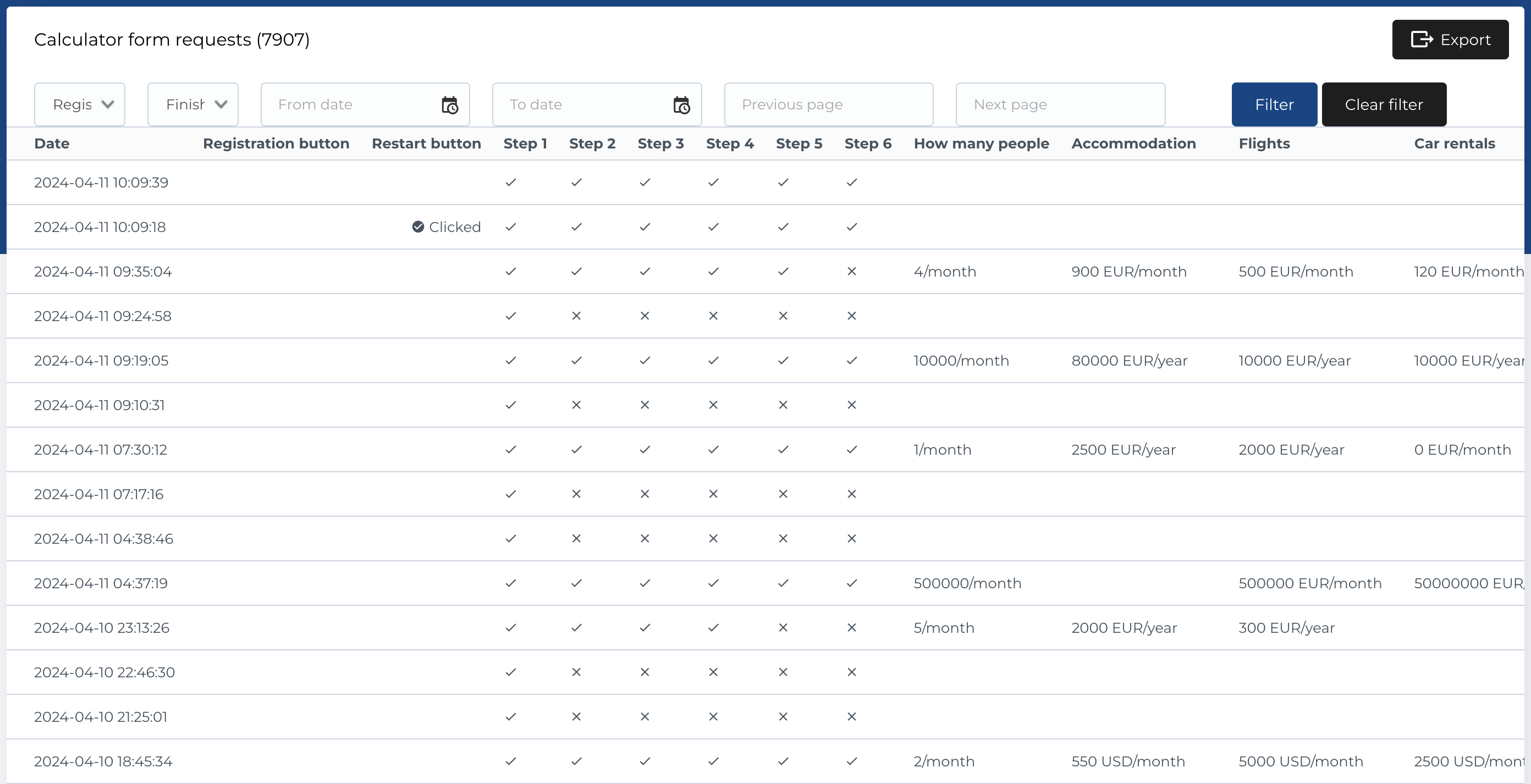
In this section in admin panel you can find list of Calculator form requests - form filling results by user in block Calculator.
Form requests list
The Form Requests section displays a list of all form submissions. The table includes the following columns:
- Date: The date the form was submitted.
- Registration Button: Displays "Clicked" if the user clicked the registration button.
- Restart Button: Displays "Clicked" if the user clicked the restart button.
- Step 1 (*step): Indicates whether the user completed this step (checkmark or cross).
- Step 2 (*step): Indicates whether the user completed this step (checkmark or cross).
- Step 3 (*step): Indicates whether the user completed this step (checkmark or cross).
- Step 4 (*step): Indicates whether the user completed this step (checkmark or cross).
- Step 5 (*step): Indicates whether the user completed this step (checkmark or cross).
- Step 6 (*step): Indicates whether the user completed this step (checkmark or cross).
- Currency: The currency selected in the form.
- How Many People: Values selected for "How many people" in the form.
- Accommodation: Values selected for "Accommodation" in the form.
- Flights: Values selected for "Flights" in the form.
- Car Rentals: Values selected for "Car rentals" in the form.
- Time Support: Values selected for "Time support" in the form.
- Fees: Values selected for "Fees" in the form.
- Geo Location: The user’s geographic location.
- Language: The selected language of the page where the form was filled.
- Previous Page: The URL the user visited before accessing the form.
- Next Page: The next URL the user visited after submitting the form.
Note: For each step, a checkmark indicates completion, while a cross indicates that the step was skipped or not completed.
Table Actions
The following actions and filters are available for managing form requests:
Filters
-
Registration Button: Dropdown with options:
- Yes: Filter for users who clicked the registration button.
- No: Filter for users who didn’t click the registration button.
-
Finished: Dropdown with options:
- Yes: Filter for completed forms.
- No: Filter for incomplete forms.
- Date Filter: Date picker to filter form submissions within a date range (From and To).
- Previous Page / Next Page: Text input fields to filter based on the previous or next page URLs.
- Filter Button: Submits the selected filters.
- Clear Filter Button: Resets all filter criteria.
Export form requests
To export form requests:
- Click the Export button.
- A modal will appear, allowing you to select which columns to include in the export.
- The export format is
.csv.
