Technical introduction
Dashboard
Languages & Translations
Pages
Blocks
Menus
Content
Libraries sections
MemSource Integration
Log actions
Configurations
Form requests
Form contact
AB service
Travel Policy Builder
Mouseflow
Page Redirects V2
Intro
This section in the admin panel manages Page Redirects V2, which functions similarly to the standard Page Redirects but operates using page selection (by Page ID) instead of direct URLs. It allows you to set up page-to-page redirections within the system, based on the internal page structure.
Page Redirects list
The table in this section provides a list of page-to-page redirects with the following columns:
-
Code: The HTTP status code used for the redirection (
301 Moved Permanentlyor307 Temporary Redirect). - Redirect From: The originating page from which users will be redirected.
- Redirect To: The target page where users will be redirected.
- Actions: Manage and control the redirection rules.
Available Actions:
- Active / Bin Switcher: Move an entry to the bin for temporary removal, with options to restore or permanently delete.
- Search (By Redirect From, Redirect To): Search and filter entries based on the originating or destination pages.
- Create New Entity: Add a new page redirect.
- Edit Existing Entity: Modify an existing redirect rule.
- Move to Bin: Temporarily remove a redirect by placing it in the bin.
- Restore Entity: Restore a previously binned redirect entry.
- Delete Entity: Permanently delete a page redirect from the system.

Create new page redirect
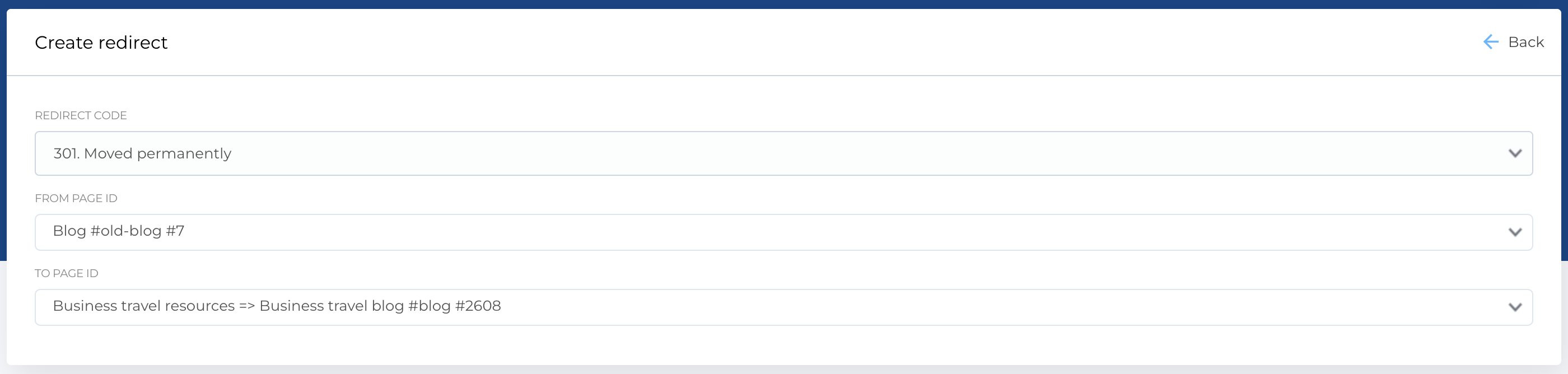
To create a new page-to-page redirect, the form contains the following fields:
-
Redirect Code: A dropdown menu that allows you to select the appropriate HTTP status code for the redirect:
-
301 Moved Permanently -
307 Temporary Redirect
-
- From Page ID: A searchable dropdown list that allows you to choose the page that will serve as the redirect source.
- To Page ID: A searchable dropdown list to select the target page where users will be redirected.
Required Fields:
- Redirect Code
- From Page ID
- To Page ID
The Edit form has the same structure as the creation form, allowing for easy modification of existing redirects.