
Technical introduction
Dashboard
Languages & Translations
Pages
Blocks
Menus
Content
Libraries sections
MemSource Integration
Log actions
Configurations
Form requests
Form contact
AB service
Travel Policy Builder
Mouseflow
Languages
Intro
This section in admin panel consists of available languages used in CMS localization. Each language has configuration for available currencies and default currency for this language. This configs used in block Calculator v2 for currency selector.
This languages are predefined, you can't create new or delete existing, because this will imply the translations will be missed for pages / blocks / etc.
Also, you can't edit the language name and locale for the same reason as above.
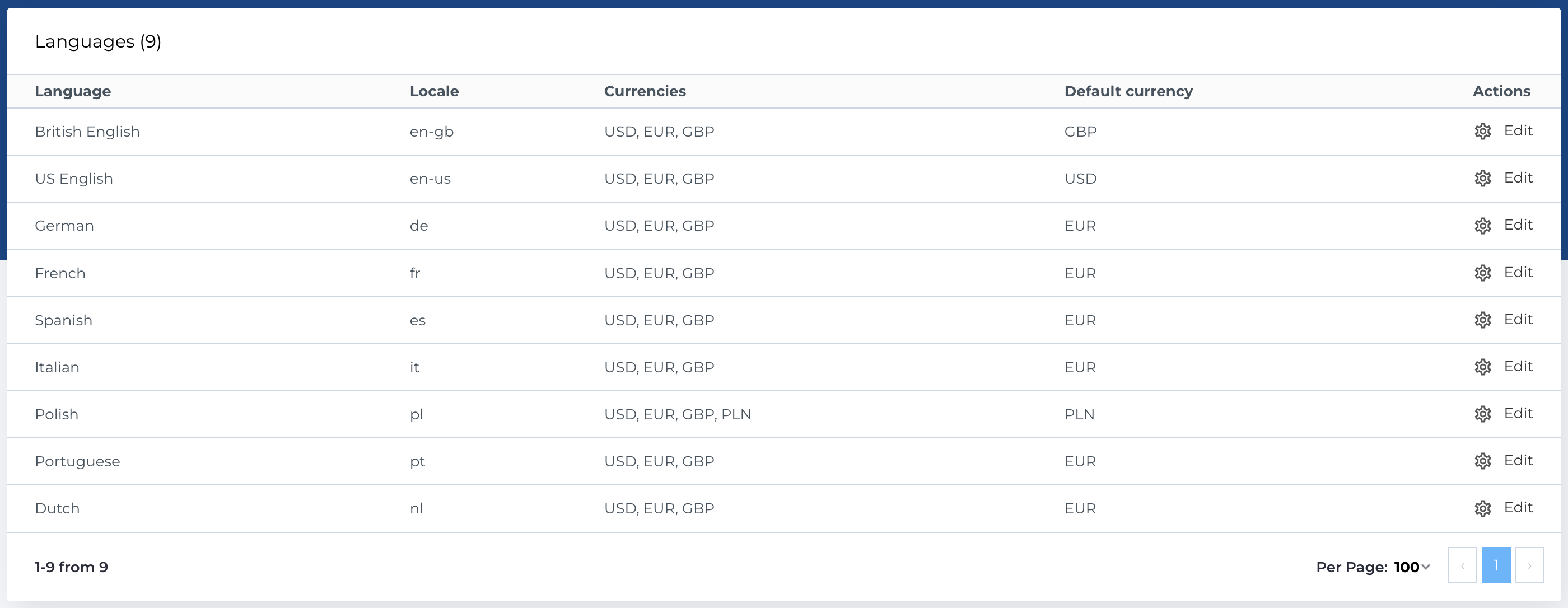
Languages list
The section contains list of languages and has next columns:
- Language: Language name.
- Locale: The locale of the language.
- Currencies: Selected currencies.
- Default currency: Default currency for language.
- Actions: Manage language settings.
Available actions
- Edit existing entity: Modify language details.
Edit language
Form contains next fileds:
- Currencies: Multiselect, options - all available currencies, which is predefined in CMS.
- Default currency: Single select, options - all available currencies, which is predefined in CMS.
There are no required fields in this form.
